When a recorded route cuts corners, distance can be understated
By Mr.Apps · Oct 21, 2026
Category:Wearable
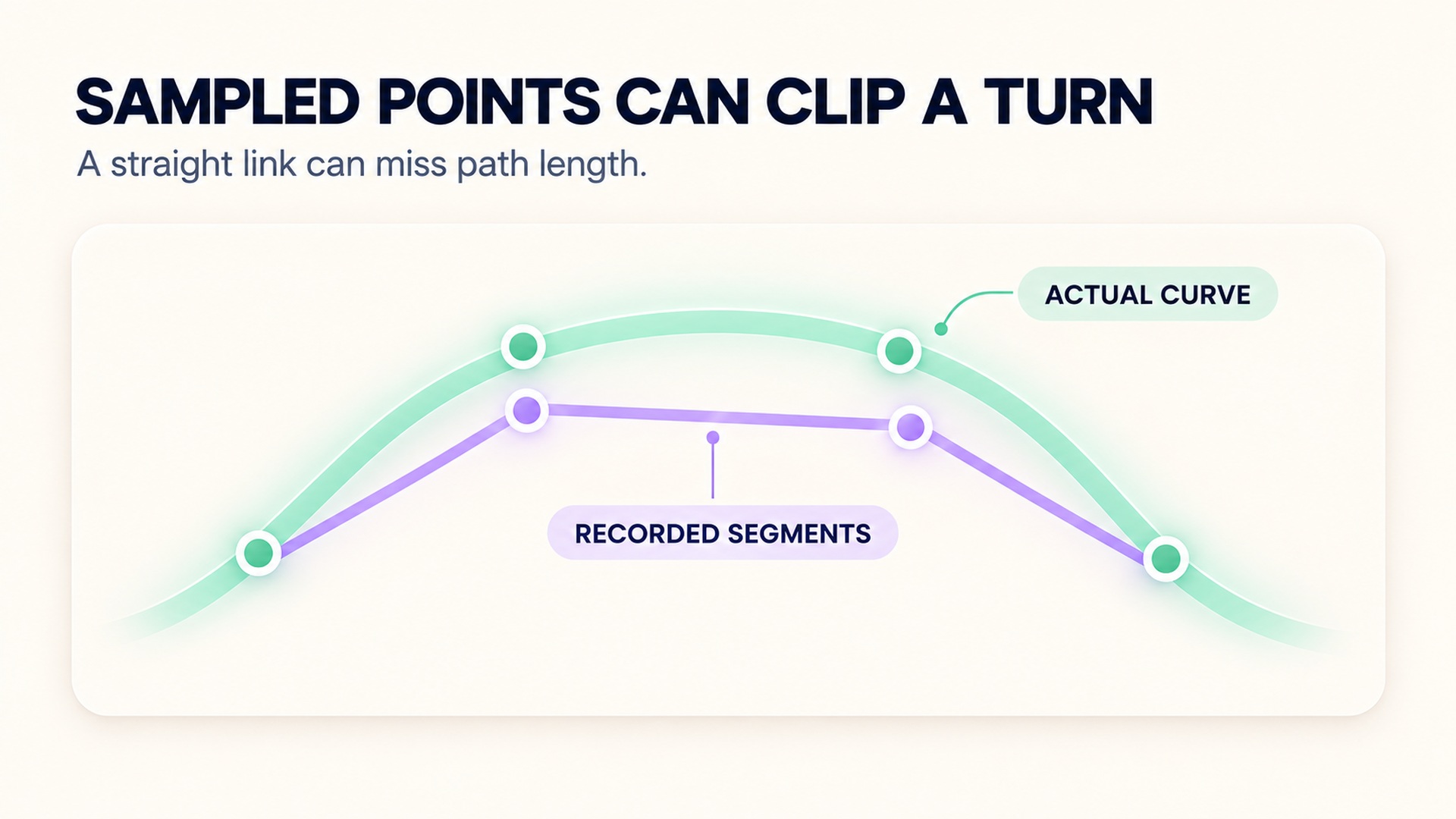
A recorded GPS route can cut across a bend even when you followed the path. The device estimates positions at separate moments, then software connects or filters those points. If a tight turn happens between position fixes, the line between them may be shorter than the actual path. A distance total can therefore understate movement on a winding route, although GPS errors can also make recorded distance too long.
The route display and distance total are related, but neither is a perfect record of every step. Look at the path, recording mode, surroundings, and device instructions before deciding what caused a mismatch. A clipped corner may point to sparse sampling or smoothing; a jagged trace near buildings may point to signal reflection or position noise. The same total can hide different errors.
How a GPS track becomes a distance
A GPS receiver estimates its position repeatedly. A device may store every position fix, or it may use a smart recording rule that keeps some points and discards others. The software then estimates the path between the saved positions and calculates distance from that line. When the line spans a curved or switchback section, it can miss some of the distance actually travelled.
For example, imagine a runner rounding a sharp corner between two recorded fixes. If the route display draws one straight segment from the position before the turn to the position after it, that segment cuts across the inside of the bend. A series of such shortcuts can add up over a route with many turns. The GPS accuracy overview explains that the receiver's positions also depend on satellite geometry, signal blockage, atmospheric conditions, and receiver design.
Why corners may disappear
How often positions are recorded can affect how much route detail is available. A longer interval between saved points leaves more movement to infer between them. If the activity includes tight bends or repeated changes of direction during that interval, a simplified line may clip the route. Smoothing can also remove small irregularities from a trace, which may make a route look neater while changing its measured length.
That does not mean the shortest-looking path on a map always proves that sampling caused the difference. The device may have a good fix while the mapping layer redraws the route. The route can also be offset by reflection from buildings, trees, or bridges. A device guide to improving GPS track distance describes how sampling and environmental distortion can affect the recorded path. These errors can move recorded points in ways that either increase or reduce the calculated distance.
Recording mode is another detail to check. Some products offer an option that records positions at a more regular interval, while other modes save data more selectively to conserve storage or power. One manufacturer's GPS distance and pace guidance describes these recording choices and other conditions that can affect a track. Availability and names vary by model, so use the setting documented for your device.
The direction of the error is not guaranteed
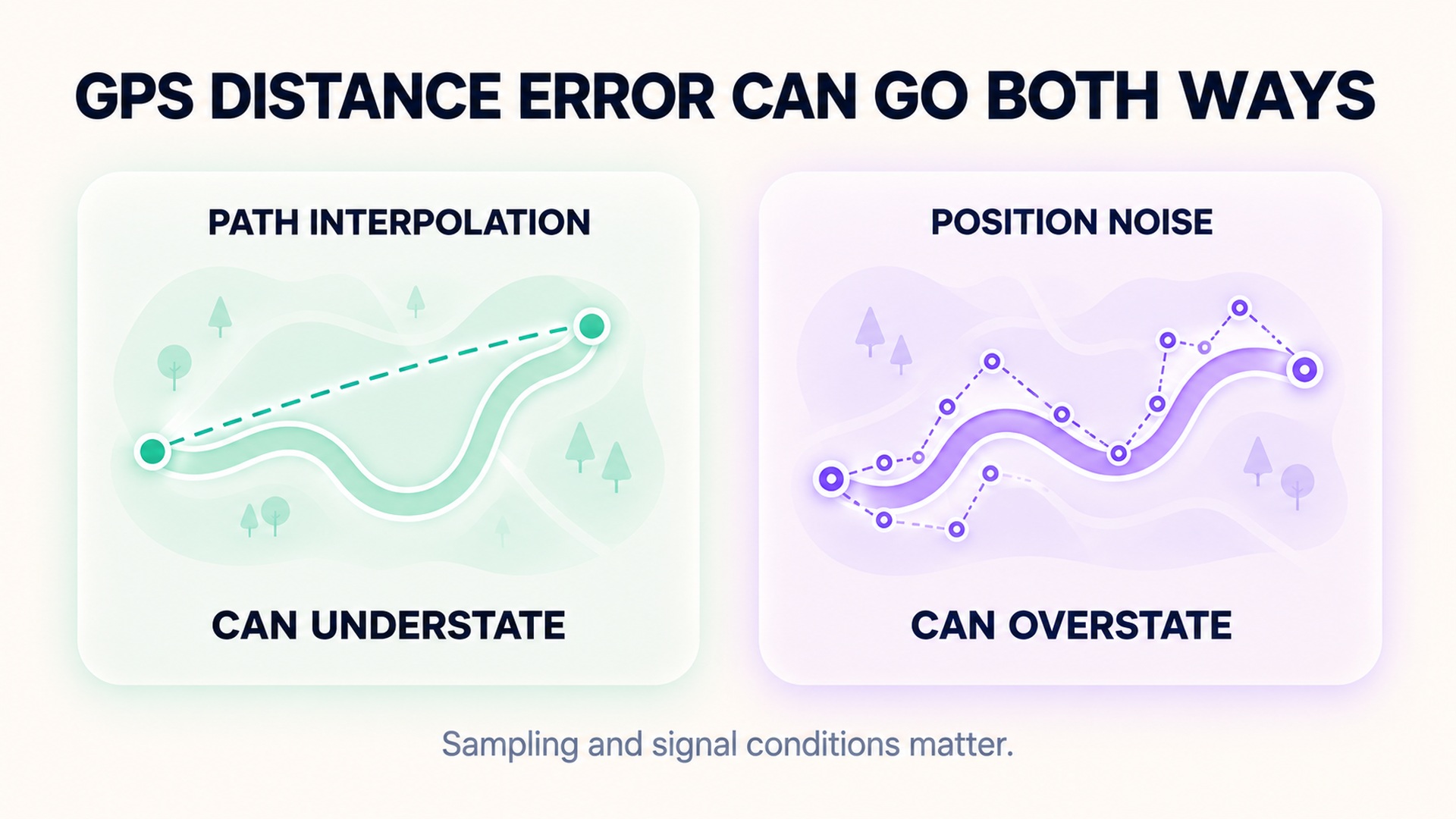
The title of this article describes one specific pattern: a route line can understate distance when it misses bends. But GPS position error can create extra wiggles that make a route longer than the actual path. Research on GPS distance estimation has shown that measurement noise can produce overestimation, while sparse sampling and interpolation can produce underestimation in some circumstances. The analysis of GPS distance measurement error explains why both effects matter and why the net result depends on the recording conditions.
In a controlled running study, researchers compared GPS distance with a reference course during curved and multidirectional movement. The device overestimated on one course and underestimated during shuttle running, where rapid direction changes occurred within sampling intervals. The study of rapid directional changes and GPS distance validity illustrates why a device may respond differently to a smooth bend than to repeated quick turns. The study used a particular GPS device, protocol, and participant group; it is not a correction factor for every workout.
Check the route and recording settings
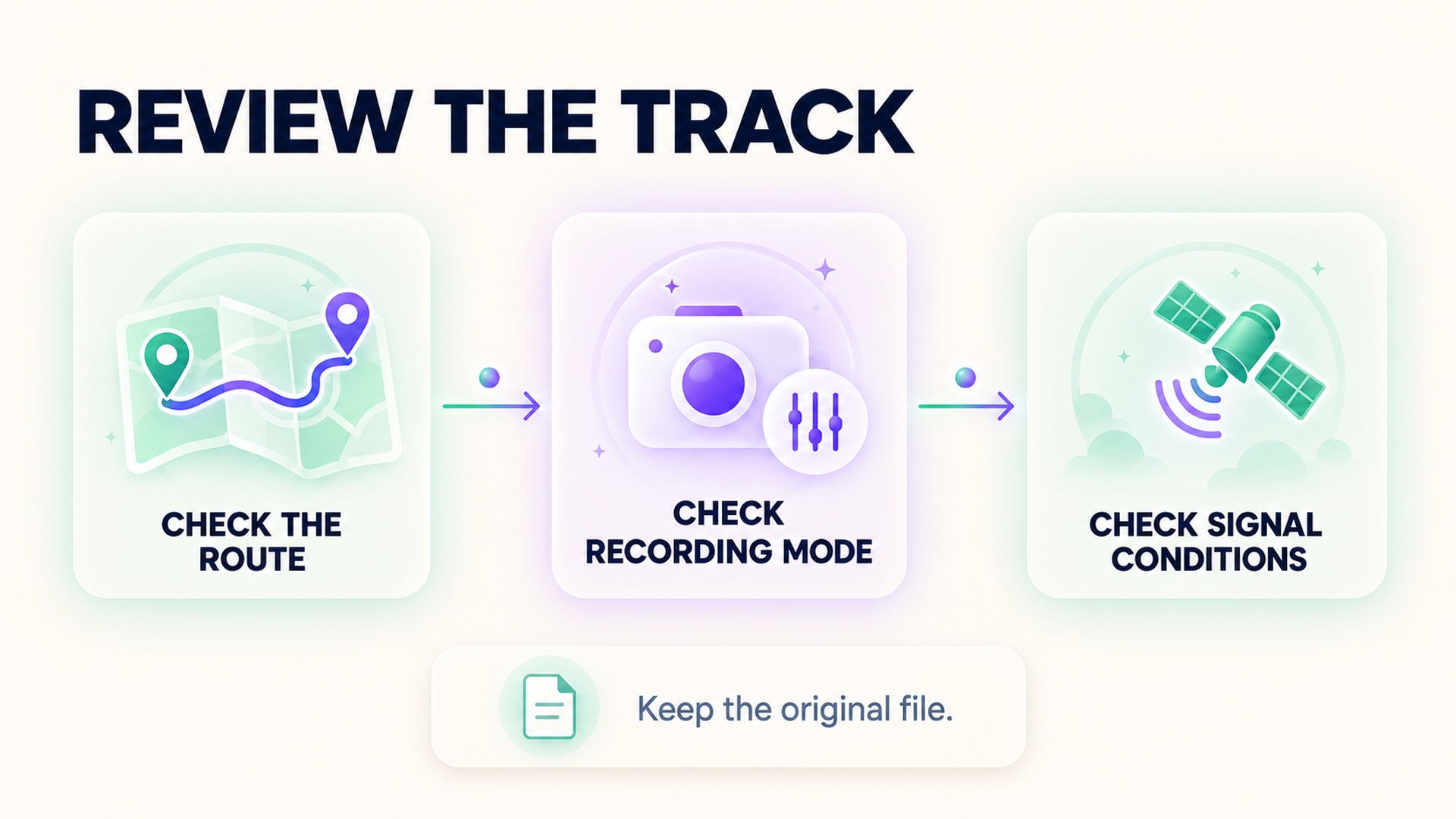
Start by comparing the recorded line with the actual route. Look closely at sharp bends, narrow paths, tree cover, buildings, tunnels, and places where the device may have lost a clear view of the sky. Check whether the line cuts across corners, jumps between streets, or becomes unusually jagged. Then review the activity's recording setting and whether the device had a stable GPS lock before you started.
Some devices recommend waiting for a strong satellite fix before recording. A track-running guide for a specific set of watches describes how a track profile can improve distance and pace accuracy on a standard running track and how GPS readiness matters for other running profiles. Track calibration is not the same as validating a winding road route, but the example shows that activity type and recording mode can change how distance is computed.
If your device supports a higher-frequency or every-second recording mode, check what it changes before relying on it. More points may help preserve turns, but they can also retain more position noise, and some devices may use additional battery or storage. Do not assume that increasing the point rate always makes a route more accurate. The correct choice depends on the route, receiver, algorithm, and purpose of the recording.
When possible, repeat a short known route in similar conditions. Compare the recorded path as well as the total distance. If the device repeatedly cuts the same tight corners, note the route and setting. If the trace shifts unpredictably around buildings, the issue may be signal conditions rather than simple corner-cutting. A related guide on distance splits and planned intervals explains how workout structure changes what a distance view can tell you; it does not replace checking the underlying GPS track.
Keep a useful record of uncertainty
For a route that matters to a training plan, save the original workout file and a map view of the track. Record the device model, activity mode, recording option, route, and any obvious signal obstructions. If the summary distance differs from a measured route, document where the recorded path changes rather than adjusting the total by an arbitrary amount. This makes later comparisons more useful and keeps the source measurement visible.
Avoid comparing two different devices as if they used the same receiver or processing method. One may record more frequently, use different filtering, or depend on a different satellite configuration. The on-screen path may also have been map-matched or smoothed after recording. If you export the activity, check whether the exported file preserves the recorded points or only the final distance and simplified map.
If a device offers official support steps for signal acquisition or track mode, follow those before changing several settings at once. A route with reliable GPS in an open area gives a cleaner comparison than one run under trees and another between tall buildings. Treat an unusually short or long total as a prompt to inspect the track, not evidence that your pace or effort changed by the same amount.
Check the saved track before changing the total
The route line you see on a map may be simplified, smoothed, or matched to a road after the activity was recorded. The distance total may have been calculated from the original fixes, recalculated by an app, or preserved from the recording device. Those are separate steps. A clean-looking line is not proof that the distance was corrected, and a rough line does not reveal the exact length of each missing turn.
If you can export the original activity, inspect whether it includes timestamped positions and whether the file differs from the map display. Keep the original file before editing or importing it into another service. When you compare distance values, note which application produced each total and whether it adjusted the path. Official GPS guidance cautions that consumer mapping errors can also come from how a map is drawn, separate from the receiver's position accuracy.
This matters when a route is reused for training. A consistent shortfall on the same tight course can be a property of the device and recording setup, while a one-time shift near buildings may be a signal or map issue. Do not apply a blanket distance correction to every run based on one route. Use the track and context to explain the discrepancy, and preserve the actual recorded value alongside any documented adjustment.
FAQ
Does GPS always underestimate distance when it cuts corners?
No. Missing a bend can shorten the connected line, but position noise and reflected signals can add extra path length. The overall error depends on sampling, signal quality, movement, and processing.
Can recording GPS more often fix a short route estimate?
It may preserve more route detail on some devices, but it can also retain more noisy points. Check the device's recording options and compare the actual track before assuming a higher sampling rate will improve the result.
Should I edit the workout distance to match the route map?
Do not change the total based only on visual impressions. Inspect the original track, route conditions, and device settings first. If you adjust a record for a specific purpose, keep the original measurement and document why it changed.
*This article is for informational purposes only and is not a substitute for professional medical advice, diagnosis or treatment.*
Sources:
GPS.gov·Garmin Support·International journal of geographical information science : IJGIS·PLOS ONE·Garmin Support·Garmin Support
Related articles

Why a floor counter can change when air pressure changes
Some wearable floor counters estimate elevation from air pressure and movement signals. Learn why weather, doorways, and calibration can affect the estimate, and how to review a surprising count.

Dry chest strap electrodes can distort the start of a workout
Some chest straps need specific electrode preparation to make reliable skin contact. Learn how dry or moving contact can affect an early trace and what to check before treating a startup spike as a heart-rate change.

Cold skin can weaken a wearable pulse signal
Cold exposure can reduce blood flow near the skin and make an optical wrist signal harder to read. Learn how to check a device-specific trace without mistaking missing data for a cardiovascular finding.

Tattoos can affect optical heart rate readings differently from skin tone
Tattoo ink and natural skin pigmentation are distinct factors for optical heart-rate sensors. Learn how to check a device-specific trace without generalizing from one wearable study or treating a gap as a health finding.

Check live sensor support separately from workout import support
A heart-rate graph arriving after a workout does not show whether an external sensor streamed data live. Check sensor pairing, app compatibility, active recording, and later import as separate steps.

A heart rate export may not contain beat interval data
A heart-rate export can contain many beats-per-minute samples without preserving the interval between each beat. Learn which fields to check before treating a file as suitable for HRV analysis.

Checking pool length before trusting a swimming distance record
Pool distance depends on both the configured pool length and the number of lengths detected. Learn how to check those inputs before accepting a swimming distance record.

Why a longest workout record is different from a fastest distance record
A longest-workout record describes duration, while a fastest-distance record uses a defined distance and time. Learn how pause rules and segment boundaries affect each result.

Why a cycling power record needs its effort duration
A cycling power record needs its averaging window to show whether it reflects a brief peak or sustained effort. Learn how duration, sensor source, and workout context affect comparisons.

Keeping transitions visible in a multisport workout record
Transition periods are part of a multisport event’s full timing record. Learn how to keep T1 and T2 separate from sport splits and verify how each activity was timed.