Instant pace can fluctuate while lap pace stays stable
By Mr.Apps · Oct 21, 2026
Category:Wearable

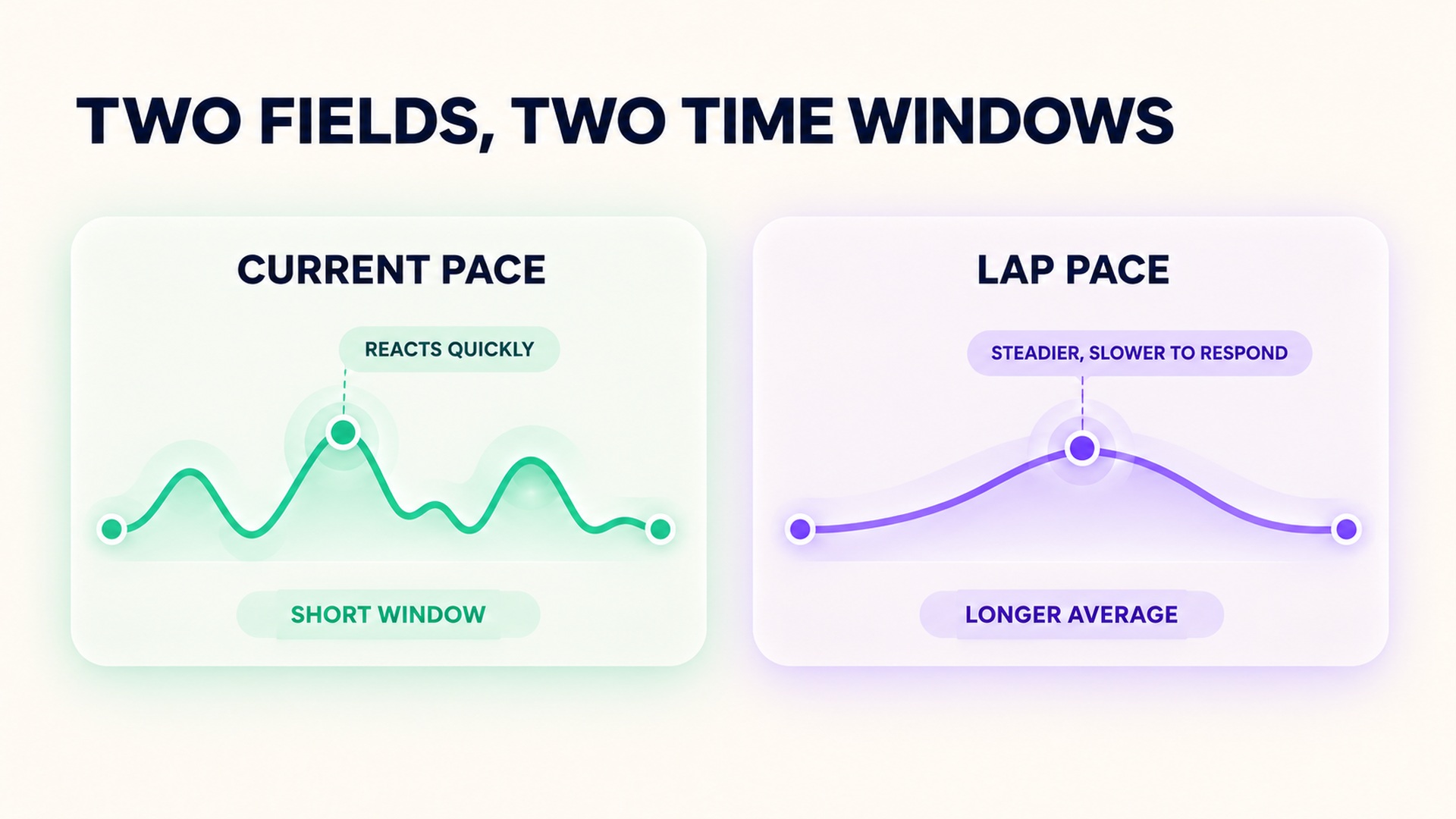
Instant pace can jump around while lap pace looks steady because the two fields summarize different time windows. A current-pace display tries to estimate speed from recent movement and position data. Lap pace averages the recorded distance over a longer completed or active lap. The longer average smooths short fluctuations, but it also responds more slowly when your pace changes.
That difference is useful during a run. A noisy instant estimate does not necessarily mean that your effort suddenly surged, and a stable lap average does not prove that every moment matched the target. Choose the field that answers the question you have: current movement, a sustained segment, or the average result across a lap.
What “instant” pace usually means
The label can imply a direct, immediate measurement, but a watch still has to estimate pace from its sensors and processing. It may use recent GPS positions, a running sensor, or a combination of inputs. Position estimates are imperfect, and the device may filter or round the displayed value so that it is not changing on every update. The pace display guidance for a running watch explains how one product rounds its current-pace display and separates that field from lap and completed-activity pace.
An estimate based on a short window can react quickly, but it is also sensitive to small position errors, signal blockage, turns, trees, buildings, and brief changes in movement. If the GPS receiver temporarily loses a clean signal, the estimated pace may pause, drift, or jump. Even when the underlying activity feels steady, the displayed value can fluctuate because the device is updating an estimate from imperfect measurements.
What lap pace adds
Lap pace divides the distance in a lap by the time recorded for that lap, or by the current elapsed time and distance while the lap is still in progress. A longer window reduces the effect of brief noisy samples, so the number often looks steadier than current pace. That steadiness can make it easier to hold a sustained effort, compare repeated intervals, or understand an average for a known segment.
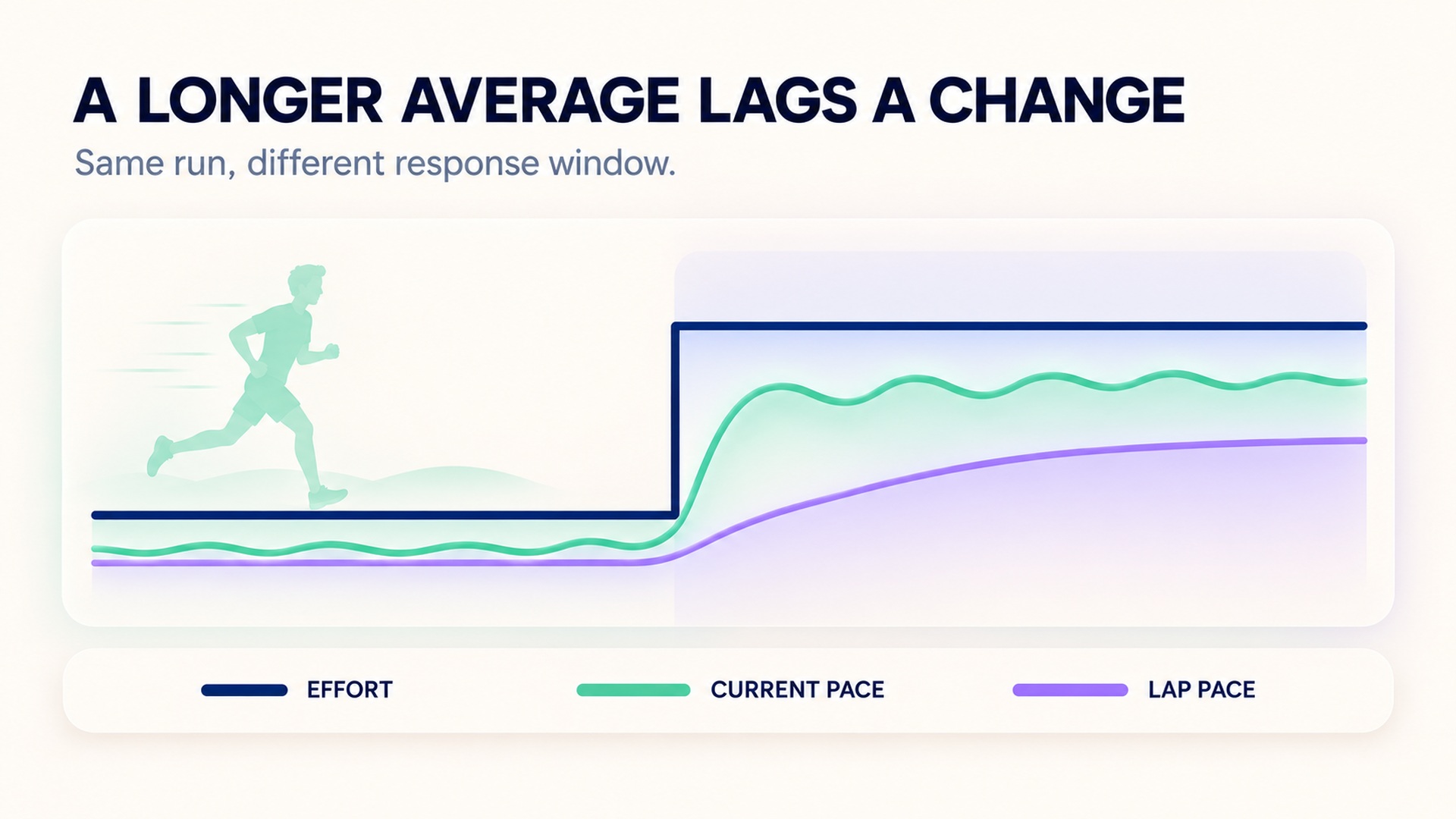
There is a trade-off: an average takes time to respond. At the start of a faster interval, the displayed lap pace still includes the slower warm-up or recovery portion that came before. If you slow down abruptly, the earlier faster running remains in the average. Manual or automatic lap boundaries determine which time and distance enter the calculation, so check how your watch starts and ends laps.
Research evaluating sports GNSS receivers shows why measurement interval matters when estimating speed. A speed value averaged over one time span cannot be compared directly with another value averaged over a different span, especially during changing movement. The evaluation of commercial GNSS receivers in endurance sports emphasizes matching the reference and measured intervals when assessing speed. That principle also helps explain why a live pace field and a lap average can disagree without either being a literal record of each stride.
Read fluctuations in context
First ask whether the value changed in a way that matches the run. A short instant-pace spike during a turn, under trees, or beside tall buildings may reflect positioning noise. A stable lap pace over a long section may conceal brief accelerations and slowdowns. The trace, route, and effort together give more context than either number alone.
If current pace is bouncing but your effort and route are steady, avoid chasing every update. Let the signal settle, or use a field based on a longer window. If you are adjusting effort for a short interval, current pace may still be useful as one input, but it should not be treated as exact. A chest-based or foot-based sensor may offer another measurement method if the device supports one; that does not mean it will match a GPS-derived pace exactly.
Software can smooth noisy GNSS speed data, but any smoothing choice balances stability against responsiveness. The research on correcting speed measurements for running applications examines how processing can reduce pace variation and how performance can differ between steadier and more fluctuating runs. Its results concern tested software and devices; they do not establish one best smoothing window for every watch or runner.
Choose the field for the decision
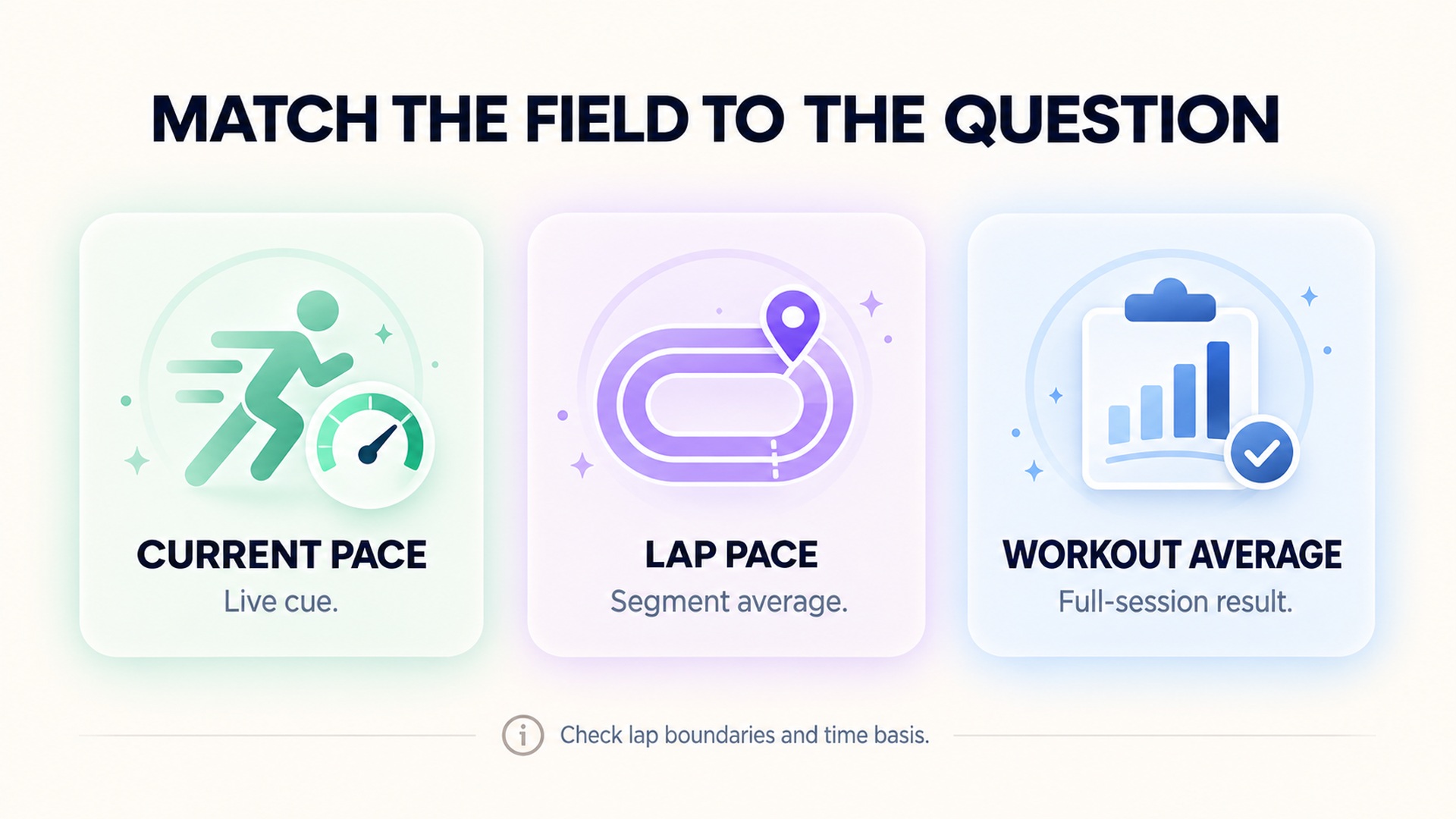
Use current pace when you need a quick, approximate indication of how the run is progressing on a reasonably clear route. Expect short-lived changes to be noisy, especially after turns or during acceleration. Give the displayed estimate time to settle rather than immediately altering effort to match a single update.
Use lap pace when you care about a sustained segment, a planned interval, or the average across a known distance. It gives a calmer view of the lap so far, but it is not designed to capture every brief change. If you use automatic laps, confirm the lap distance and where each boundary occurs. On a manually controlled workout, press the lap button at consistent points so repeated comparisons use similar windows.
Average pace for the whole workout answers another question: what was the average across the full recorded session? It can hide warm-up, stops, recoveries, and faster intervals. The GPS accuracy information explains that signal blockage, multipath reflections, atmospheric conditions, and receiver quality affect GPS position and speed. A single average pace should therefore be interpreted alongside the recorded time basis and route.
Different watch brands and activity modes may define their pace fields differently. Some current-pace displays round the estimate; some support a track profile or a foot sensor; some lap fields update only after a lap banner. The running pace and distance advice for a GPS watch describes recording settings and GPS conditions that can affect the data. The running sensor manual distinguishes current, lap, and average speed/pace fields for its device family. Read the corresponding instructions rather than assuming two screens use identical calculations.
An internal guide to moving time and elapsed time on pace charts covers another setting that changes how a pace summary should be read. Before comparing workouts, check the field name, lap boundary, pause behavior, and time basis. Otherwise, a change in display rules can look like a change in running performance.
Make a steady comparison
If you are comparing two runs, use the same route, device placement, activity profile, recording mode, and lap distance when practical. Note weather and signal conditions, especially if part of the route passes beneath trees or beside tall buildings. Compare lap pace across similar segments and use current pace only as a moment-to-moment aid. This keeps the comparison focused on performance instead of a different processing setup.
If you are testing whether the current pace field is stable enough for a particular workout, choose a straight, open section and hold an even effort for a short period. Compare the live display with a known distance or lap average after the segment ends. The comparison will not prove which value is exact, but it can show whether the current field is too jumpy for your purpose in those conditions.
For intervals, look at both pace and the start and end of each lap. A lap average can show whether the overall repetition was near its target, while current pace may offer faster feedback once the initial acceleration settles. During recovery, do not assume the current pace should immediately match the slower effort. The device may still be smoothing recent position data, while the lap average continues to include the faster section.
Check how the watch defines the active lap. Some devices update lap pace while a lap is in progress and finalize it when the lap ends; an automatic lap may start based on distance, while a manual lap starts when you press a button. Pauses can also change the time included in the calculation. When two laps seem inconsistent, check their boundaries and time settings before reading the pace difference as a change in effort.
The displayed current pace may also be rounded for readability. A few seconds of rounding can make small changes look larger or smaller than the underlying estimate. If your workout calls for a narrow pace range, use a field with an averaging window that matches the length of the effort, and judge a sustained segment rather than reacting to one update.
The practical distinction is about time window: current pace is a short-window estimate that can react quickly and fluctuate; lap pace is an average that settles noise but lags changes. Neither should be interpreted without the route, signal, activity, and device settings. Pick the one that matches the decision you are making and keep its limitations in view.
FAQ
Why does instant pace jump while I feel steady?
The device estimates pace from recent movement and GPS or sensor data, which can fluctuate with signal quality, turns, and processing. A short update can move even when your effort feels consistent.
Is lap pace more accurate than instant pace?
Lap pace is averaged over a longer interval, so it is usually steadier, but it responds more slowly to changes and depends on the lap boundary. It answers a different question from a short-window current-pace estimate.
Which pace field should I use for intervals?
Use lap pace to review the average for a completed repetition and current pace as a rough live cue once the signal settles. Check that lap distance and start/end points are consistent across repetitions.
*This article is for informational purposes only and is not a substitute for professional medical advice, diagnosis or treatment.*
Sources:
Garmin Support·Frontiers in Physiology·Sensors (Basel, Switzerland)·GPS.gov·Garmin Support·Polar
Related articles
When a recorded route cuts corners, distance can be understated
A GPS route can connect recorded positions with a line that clips tight bends, leaving out part of the path. Learn why sampling, signal conditions, and route rendering can affect distance without implying a change in fitness or pace.
Why a floor counter can change when air pressure changes
Some wearable floor counters estimate elevation from air pressure and movement signals. Learn why weather, doorways, and calibration can affect the estimate, and how to review a surprising count.

Dry chest strap electrodes can distort the start of a workout
Some chest straps need specific electrode preparation to make reliable skin contact. Learn how dry or moving contact can affect an early trace and what to check before treating a startup spike as a heart-rate change.
Cold skin can weaken a wearable pulse signal
Cold exposure can reduce blood flow near the skin and make an optical wrist signal harder to read. Learn how to check a device-specific trace without mistaking missing data for a cardiovascular finding.

Tattoos can affect optical heart rate readings differently from skin tone
Tattoo ink and natural skin pigmentation are distinct factors for optical heart-rate sensors. Learn how to check a device-specific trace without generalizing from one wearable study or treating a gap as a health finding.
Check live sensor support separately from workout import support
A heart-rate graph arriving after a workout does not show whether an external sensor streamed data live. Check sensor pairing, app compatibility, active recording, and later import as separate steps.

A heart rate export may not contain beat interval data
A heart-rate export can contain many beats-per-minute samples without preserving the interval between each beat. Learn which fields to check before treating a file as suitable for HRV analysis.

Checking pool length before trusting a swimming distance record
Pool distance depends on both the configured pool length and the number of lengths detected. Learn how to check those inputs before accepting a swimming distance record.

Why a longest workout record is different from a fastest distance record
A longest-workout record describes duration, while a fastest-distance record uses a defined distance and time. Learn how pause rules and segment boundaries affect each result.

Why a cycling power record needs its effort duration
A cycling power record needs its averaging window to show whether it reflects a brief peak or sustained effort. Learn how duration, sensor source, and workout context affect comparisons.