Confirm a workout has stopped before trusting its final totals
By Mr.Apps · Oct 23, 2026
Category:Wearable
An activity can appear finished to the person wearing a device while the recording remains active. That gap matters because the watch or app may continue adding elapsed time, heart-rate samples, or other data after the exercise itself has ended. Before interpreting the final totals, I check that the session has been stopped and that its saved summary represents the intended activity.
This is a record-quality question, not a judgment about effort. A longer duration does not necessarily mean a longer workout, and a notification that suggests stopping does not necessarily prove that a session was saved. The reliable sequence is simple: end the recording, complete any confirmation screen, then open the stored session and inspect its boundaries and totals.
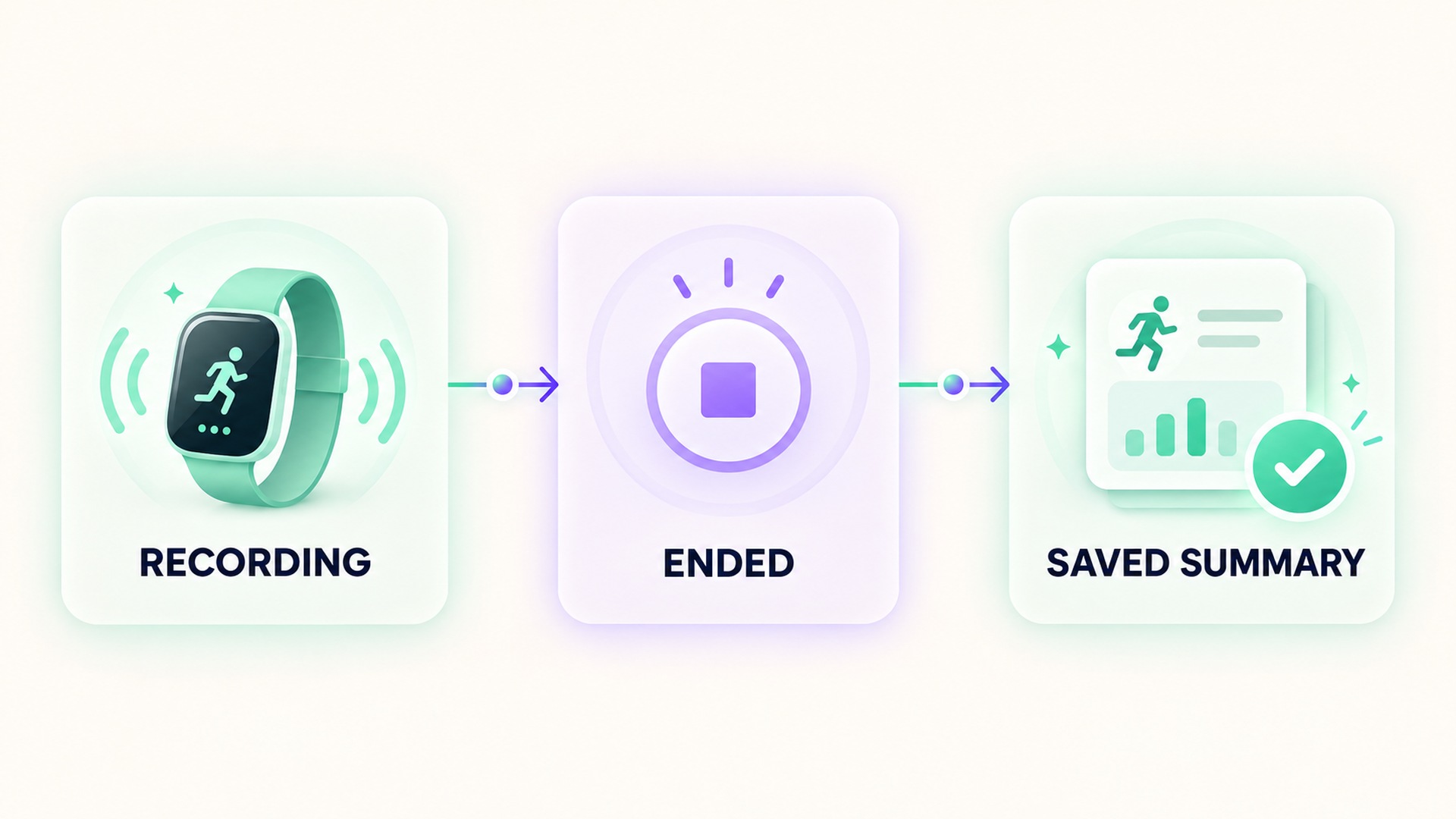
A finished exercise and a finished recording are different events
Many workout tools treat the timer as a session controlled by the user. The device can keep collecting data until an end command is given, even after a target is reached or movement has slowed. On some watches, reminders can notice inactivity and prompt the wearer, but the reminder is a prompt to take action. It does not always end the session by itself. The description of workout end reminders explains that its reminder feature uses inactivity detection on supported watches and asks the user to stop the workout.
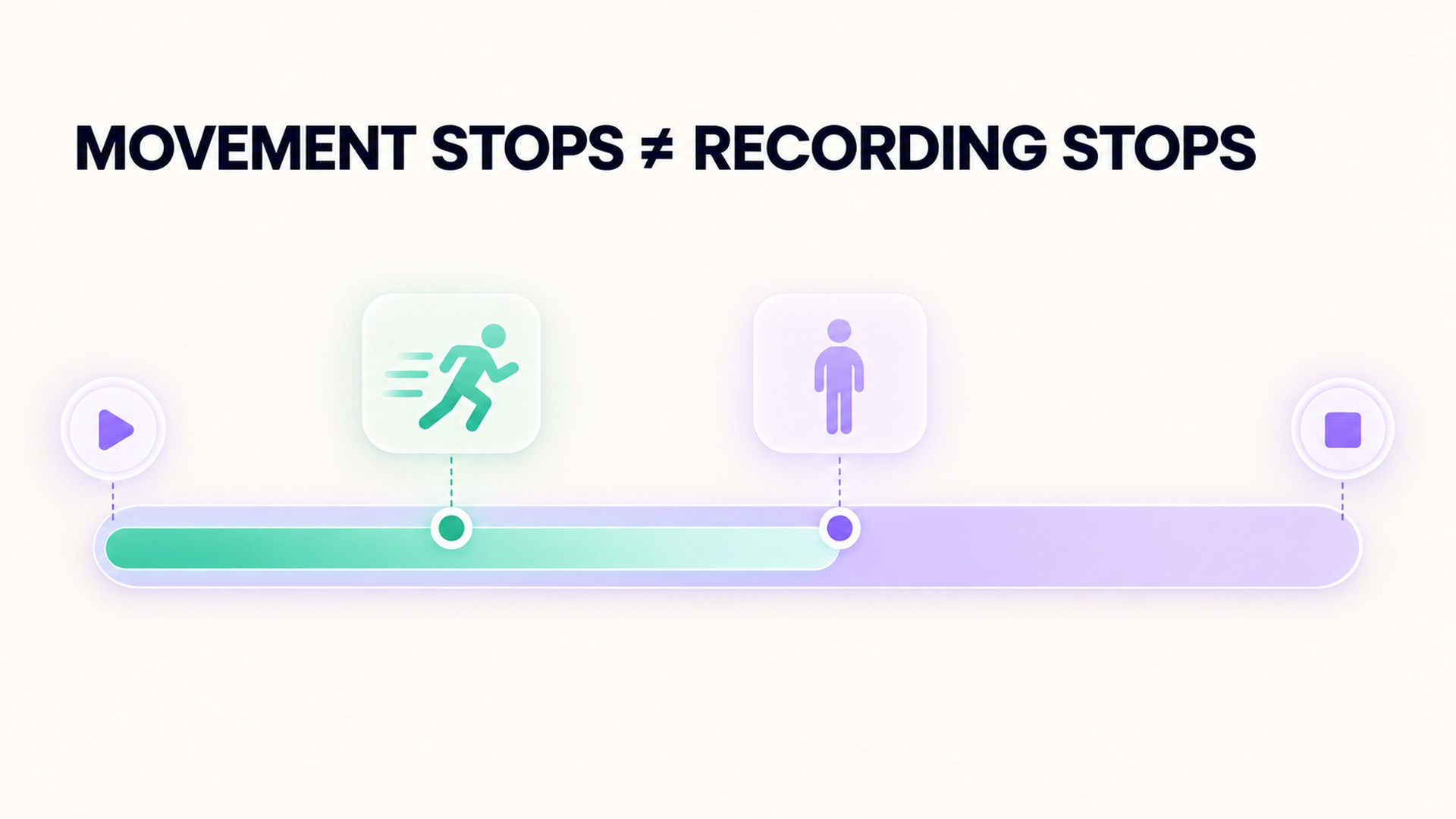
That distinction is easy to miss when attention is on cooling down, leaving a room, or moving on to another task. A workout may remain open through a period of standing, walking, or getting ready to leave. Depending on the app, that period can be included in elapsed duration even when it does not belong to the planned exercise. The issue is not that the device is necessarily inaccurate. It may be accurately reporting the full recording interval while the person intends to describe only the exercise interval.
In my review, I separate at least three times: when the activity began, when purposeful exercise ended, and when the recording ended. These may match, but they do not have to. A person may pause for a drink, continue with a different activity, or cool down while leaving the same session open. The workout controls documented for a watch distinguish pausing, resuming, and ending, which reflects that these actions describe different session states.
Why the final totals depend on the end point
Duration is the most visible field affected by an open session, but it is not the only one. If the app includes the entire interval in its workout summary, average pace, average heart rate, or other time-based calculations may be influenced by periods that were not part of the intended effort. The effect depends on the metric and the product’s calculation rules. I avoid assuming that every field is recalculated from the same start and stop points.
For example, some summaries report elapsed time, while other fields can be based on moving time, timed intervals, or samples collected only when a sensor produces a usable reading. A pause can therefore change one field without changing another. When a result seems odd, the first question is not whether a number is “wrong.” It is what interval that number describes and whether that interval matches the activity being reviewed.
A data record also has a boundary beyond the screen’s current display. The session may need a final confirmation, a save action, or a later sync before the summary appears in history. On one supported platform, an exercise session record has explicit start and end times, and can contain separate measurements such as heart-rate samples. The documented workout data model is a useful illustration of why a saved workout interval and its associated measurements should be checked as related but distinct parts of a record.
A notification is not the same as a saved session
Wearable reminders can be helpful when the wearer forgets to stop. They are still only one layer of the workflow. A vibration, banner, sound, or spoken prompt may tell the user that the device believes the exercise has ended. The next step may require opening the workout screen and choosing an end control. Another screen may ask for confirmation or show a summary before saving.
The exact sequence varies by app and device, so I follow the visible controls instead of assuming that a single tap has the same effect everywhere. Some systems support an end-workout confirmation setting. The setting for end-workout confirmation describes an extra prompt that can help prevent an accidental end. The setting changes the interaction, but it does not replace checking the saved record afterward.
Review the saved record before interpreting it
After ending the workout, I open its summary from the history view rather than relying only on the end screen. The saved entry should correspond to the intended date, activity type, and approximate time. I compare its start and end times with what I meant to record. If the app offers both elapsed and moving time, I look at the labels before comparing one session with another.
Next, I inspect the fields that prompted the question. If duration seems too long, a late stop may explain it. If a heart-rate average changed, I look for an extended low-activity period or a gap in sensor readings. If distance or pace changed, I check whether the device included the full session interval, the moving portion, or only GPS-supported portions. These are possible explanations to investigate, not proof of what happened in a particular record.
The watch may continue collecting a limited sensor signal after the workout has ended for a recovery feature. That does not automatically mean the workout itself is still recording. The summary and sensor timeline can have different boundaries. The instructions for ending and reviewing a workout describe both an end flow and later review in the workout history. The important point is to inspect the session record itself instead of treating any continued sensor activity as evidence that the workout remains open.
For records that sync across apps, check the source and the receiving app’s import status too. A session may appear in one history before another, and the second app may show only the fields it imported. On one supported platform, an exercise session and associated data have their own record structures, and apps need user permissions to read them. The exercise-session record reference shows how session boundaries are represented. A summary that has not finished syncing is not the same as a confirmed absence of data.
A routine that protects the record
I recommend using the same short closeout sequence after each session: look at the workout screen, select the end control, complete any confirmation, wait for the summary, and open the saved entry from history. Confirm that the entry is present before starting another session. This adds only a few moments and makes a later comparison more meaningful.
If a reminder appears during an activity that includes walking between intervals or stations, decide whether the whole session should remain open. A stop-start workout can legitimately contain periods of low movement. A prompt is a cue to review the session, not a verdict on whether the workout is over.
When an unexpected total remains after the session is saved, record what the display calls the relevant field and compare the start and end times. If the app supports editing, review the available correction controls and their effect on linked data before making changes. Keep the original context in mind: a stopped session may still have a delayed route or heart-rate sync, while a session that was never ended may include extra time. Those are different problems and call for different checks.
Do not edit a record simply to make it resemble another workout. A longer session can be valid if the activity truly continued; a short one can be valid if the recording started late. The goal is an honest description of the recorded interval. If the device or app provides an explicit explanation of how it calculates duration, averages, or pauses, use that definition when comparing sessions. If the behavior is not documented, describe the uncertainty rather than guessing.
What to check when the totals still look unusual
Start with the session boundaries, then inspect the field definitions and sensor data. Ask whether the recording began before the activity, stayed open during a break, or ended after the exercise. Check whether auto-pause was enabled and whether the app treats it as a temporary pause or a separate session. A setting may affect future recordings without changing older data.
The final total is useful only when its boundaries are understood. A stopped recording and a saved record are the two checks that let me interpret the numbers with care. For broader context on how workout records can be transferred between services, see this guide to keeping workout history understandable.
Frequently asked questions
Does an end-workout reminder stop the recording automatically?
Not necessarily. Some reminders ask the wearer to open the workout controls and stop the session. Check the wording on the device, then verify that the saved summary appears in workout history.
Why can elapsed time be longer than the time spent exercising?
Elapsed time may cover the full recording interval, including a pause or cool-down. Moving time or other duration fields may use different rules, so compare the labels and boundaries before interpreting the difference.
What should I do if I cannot find the saved workout?
Check the correct date and activity filter, then allow the app’s normal sync process to finish. Avoid recording a replacement until you have checked whether the original session is pending, saved elsewhere, or already present in another connected app.
*This article is for informational purposes only and is not a substitute for professional medical advice, diagnosis or treatment.*
Sources:
Google Fit Help·Apple Support·Apple Support·Apple Support·Android Developers·Android Developers
Related articles
A supplement quality seal does not prove a recovery benefit
A quality seal may indicate that a product passed specific checks, but it does not show that the supplement improves recovery. Keep manufacturing evidence, ingredient evidence, and human outcome evidence separate.

Lower energy after cutting caffeine may need withdrawal context
Fatigue after reducing caffeine can be part of withdrawal, but it is not the only possible explanation. Keep the timing of the change, symptoms, sleep, and other context together before interpreting an energy score.

Total fat does not describe the saturated fat in a food log
Total fat and saturated fat are related label fields, but they are not interchangeable. Keep the total and its saturated-fat component visible when recording food or comparing packages.

Net carbohydrate claims need the total carbohydrate record beside them
A “net carb” number can hide how it was calculated. Keep total carbohydrate, fiber, sugar alcohols, serving size, and the subtraction method together so a food record remains interpretable.

Check servings per container before logging a whole package
Nutrition values are often listed per serving even when a package contains several servings. Check the serving count and the amount eaten before entering the whole package into a food log.
Sodium and salt amounts should not be entered as the same number
Salt and sodium are related but they are not the same quantity. Keep the label’s nutrient value and the food’s salt description separate so a nutrition log does not silently change units.

Add caffeine milligrams across drinks, foods and supplements
A caffeine journal is more accurate when it counts milligrams from drinks, foods, and supplements together. Keep product serving sizes and unknown amounts visible instead of treating each item as one equal dose.

Sleep changes after reducing alcohol need more than a score comparison
Sleep may change after someone reduces alcohol, but a score comparison cannot explain the cause or the course. A useful review includes symptoms, timing, routine, device limits, and medical support when needed.

Alcohol tolerance does not establish that recovery is unaffected
Feeling less affected by alcohol does not show that the body or sleep is unaffected. Keep subjective tolerance, drinking records, wearable estimates, and clinical recovery as separate questions.

Count alcohol content rather than glasses in a recovery journal
A glass count can hide differences in serving size and alcohol strength. Record the beverage amount and its alcohol content so a journal preserves the inputs behind each estimate.